Home How It Works Smart Tools Pricing Compare Plans About Us Our Team Contact
Sign In Get Started
🧠

Smart Tools

The daily work queue built for car salespeople. Hit Refresh on your dashboard and ListFlow shows you what to post, what to reprice, and what's already sold. You click Post on every listing. Always.

Dashboard walkthrough, 1 minute.

Your Work, Sorted by What Matters

Click Refresh on your dashboard and ListFlow surfaces four kinds of work, each with a live count and a one-click action.
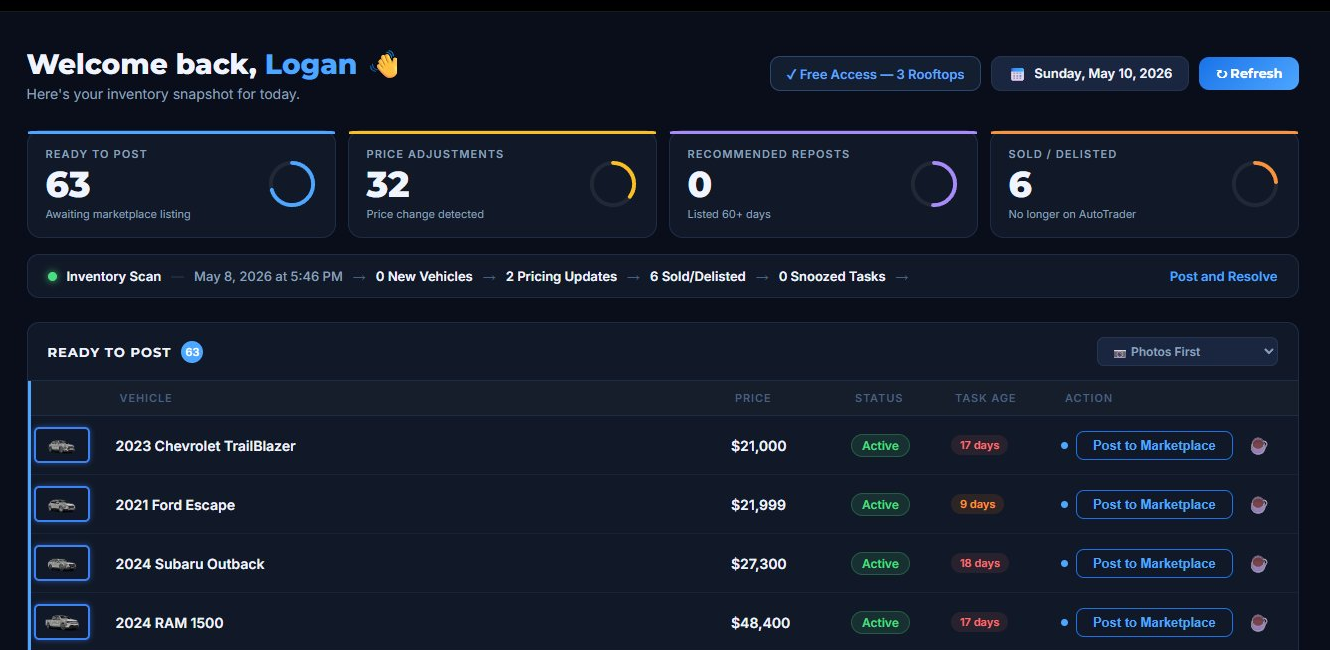
ListFlow dashboard showing the four task counts: Ready to Post 63, Price Adjustments 32, Recommended Reposts 0, Sold or Delisted 6, plus the Inventory Scan summary bar and Ready to Post queue

Your dashboard at 8 AM on a Tuesday. Click Refresh and the counts update.

🆕

Ready to Post

AWAITING MARKETPLACE LISTING

New vehicles on your lot that haven't hit Facebook Marketplace yet. ListFlow flags them the next time you refresh, so you never miss a fresh arrival.

💲

Price Adjustments

PRICE CHANGE DETECTED

If your next scan catches a new AutoTrader price on a vehicle you've already posted, ListFlow flags it with old and new prices side by side. Update the Facebook listing without hunting through old posts.

Recommended Reposts

LISTED 60+ DAYS

Facebook Marketplace listings lose visibility after about 60 days. ListFlow reminds you which ones are aging out so you can give them a fresh push when they need it.

🏁

Sold / Delisted

NO LONGER ON AUTOTRADER

When a scan catches a vehicle that's no longer in your AutoTrader inventory (sold, traded, or moved), ListFlow lines it up for you to take down from Facebook. Your active listings stay clean.

↻ HOW LISTFLOW KNOWS

You run the scan. We do the comparing.

Click Refresh on your dashboard and ListFlow runs an Inventory Scan: a lightweight check that compares your current AutoTrader inventory against what's already in ListFlow. You see exactly what changed: new vehicles, price updates, and sold or delisted cars. Scans only run when you ask for one, never on a background timer, and every account has a built-in daily rate limit. We're guests on AutoTrader's site, and we act like it.
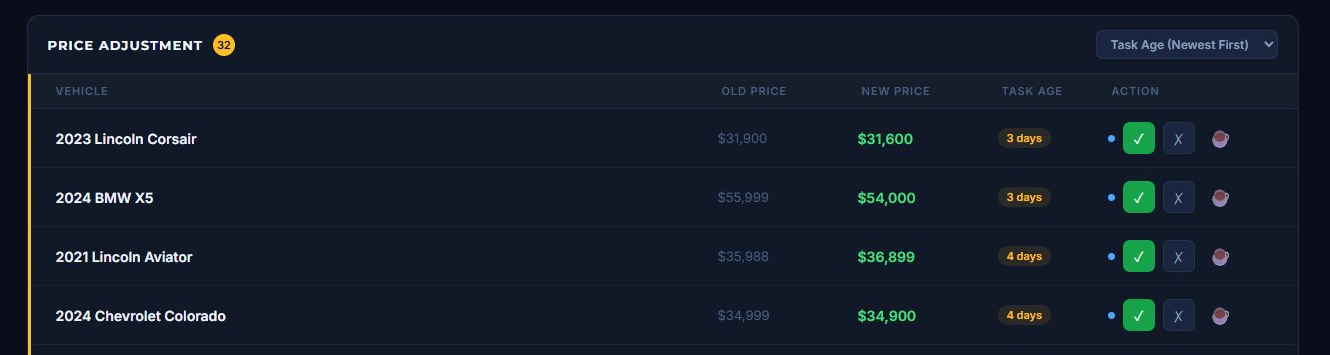
ListFlow Price Adjustments queue showing vehicles with old prices struck through and new prices in green, with task age and one-click approve or reject buttons

Price changes from your AutoTrader feed, ready to approve or skip in one click.

Built for How Salespeople Actually Work

Small details that save real time across a busy day.

📷

Photos First Sort

The biggest bottleneck on a new listing is usually photos. ListFlow's Photos First sort puts photo-ready vehicles at the top of your Ready to Post queue, so you never waste a click on work you can't finish.

📂

Active Listings Tracker

Every vehicle you've posted shows up searchable by make, model, VIN, or price. Filter by Needs Repost, Price Dropped, or Up to Date. Mark Sold in one click. Keep a separate Delisted archive for reference.

🏢

Multi-Rooftop Support

Work across multiple locations? The Multi-Rooftop plan lines up all three dealerships' tasks on a single dashboard. No switching accounts, no missed work, no duplicate posts.

ListFlow showing No Reposts Needed empty state with a green star icon, message that all active listings are fresh, and the Sold or Delisted queue underneath

When everything's fresh, ListFlow tells you. No false alarms, no busywork.

AI That Sounds Like You

Five writing styles to choose from. Pick your default in Settings and ListFlow applies it automatically to every listing. Want a different style for a specific vehicle? Click Generate Description in the extension and pick another.

💼
Professional

Clean, dealer-standard copy.

📊
Quick Stats

Numbers-forward for shoppers who skim.

💬
Seller Story

Warm narrative pitch.

🏪
Dealer Post

Matches how dealer groups write listings.

Top Features

Leads with the equipment buyers search for.

ListFlow Settings showing the Default AI Description Style dropdown open with five options: Professional (highlighted), Quick Stats, Seller Story, Dealer Post, and Top Features

Pick once in Settings. ListFlow applies it to every listing.

✒️ Your Signature Line, Every Time

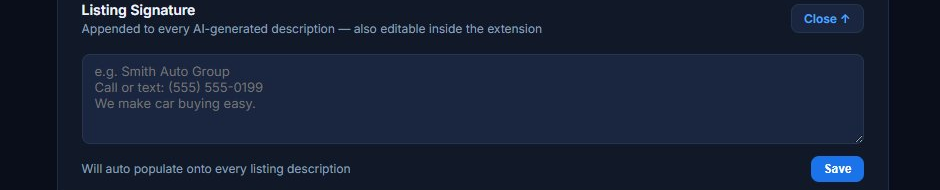
Set your name, phone number, and dealership tagline once in settings. ListFlow appends it to every AI description, so buyers always know exactly who to contact. Your identity stays on every listing, even when you swap styles.

ListFlow Settings showing the Listing Signature input field with example placeholder text for a dealership name, phone number, and tagline that auto-populates onto every listing description
ListFlow scale summary showing 150 Synced Inventory, 87 Active Listings, 49 In Sync, and 63 Pending Action across the user's dealership rooftops

Live counts across your rooftops. Always one click away.

You Stay in Control

ListFlow is assistive, not automatic. Every action that touches AutoTrader or Facebook is triggered by you. Scans run only when you click Refresh. Nothing publishes until you review the listing twice, once in ListFlow and again on Facebook's own form. ListFlow never stores your Facebook or AutoTrader password.

2 review checkpoints per listing 0 passwords stored 0 automated posting You click Refresh and Post, always

Ready for a Better Way to List?

10 free listings, no credit card required. Built by a working car salesperson. 10+ years in the industry, 2,000+ vehicles personally sold.

Start for Free

No credit card required • 10 free listings